A weather panel with no API, drop it into any page, WordPress included
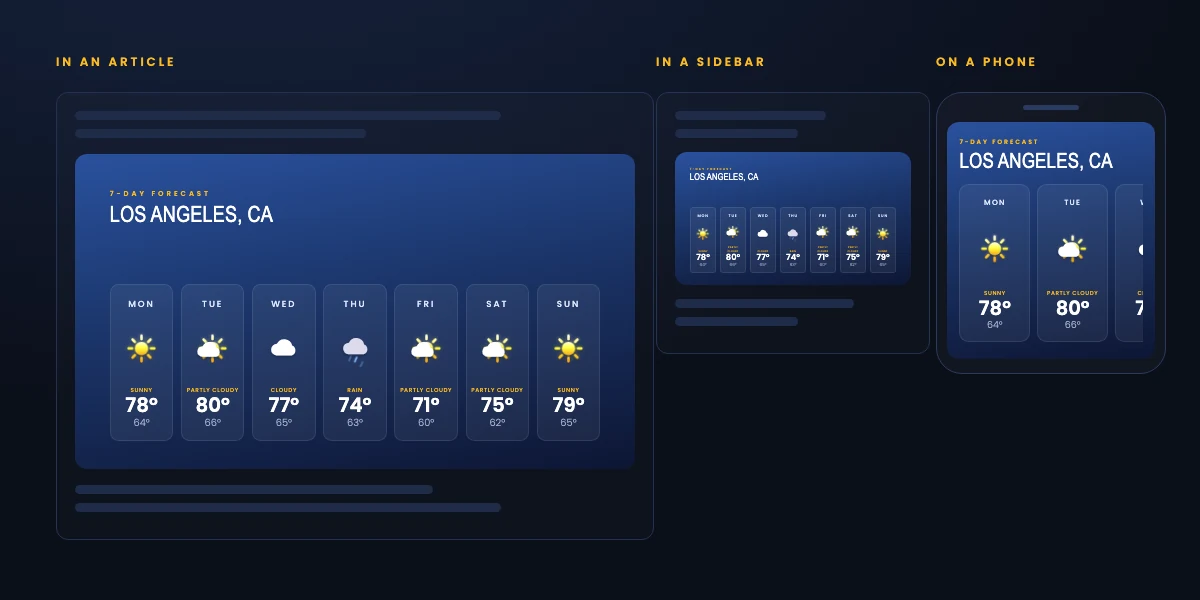
One 22 KB JavaScript file and one tag. The panel fetches the forecast on its own, scales to whatever contains it, takes the colours you hand it in CSS, and folds into a swipeable row when space runs out. No API key, no account, no build step, no framework. In WordPress it is a custom HTML block and three lines.
It started as an After Effects template for a seven-day forecast, the sort of thing you pull out for a local station’s lower third. A video, in other words: nice, but frozen, and needing a render every time the weather moves. So the question asked itself. Does the same thing hold up in a web page, with real data behind it?
It does. And since it does, it may as well be given away.
A 18 KB zip: the element, a demo page, a read-me and the After Effects script that fills the original composition. Free for personal and commercial work.
Putting it in a page
Copy ld-forecast.js next to your page and write two lines.
The minimum
<script src="ld-forecast.js" defer></script>

<ld-forecast lieu="Marseille" unite="c"></ld-forecast>
That is the whole thing. The name gets geocoded, the forecast gets fetched, the panel draws itself. If you already know the coordinates, pass them and you save a round trip.
With coordinates
<ld-forecast lieu="Los Angeles, CA"
             lat="34.05223" lon="-118.24368"></ld-forecast>
The attribute names are French, because the element was written in French and renaming them now would break every page already using it. Data comes from Open-Meteo, called straight from the visitor’s browser. No key and no account, which is what the next section is about.
No API key, and that is not a detail
This is usually the tedious part. Weather services want an account, a key, sometimes a card on file “just in case”, and a dashboard to keep an eye on. Then comes the real problem, the one the tutorials skip: a key sitting in a page is public. Any visitor can open the source, copy it, and spend your quota for you. Avoiding that means a server-side proxy, so a PHP file, a function, one more plugin, and one more thing that can break.
Open-Meteo asks for none of it. The API is open, it allows browser calls, and there is no key to protect because there is no key. The panel queries the service straight from the visitor’s page.
What that changes in practice:
- nothing to create, nothing to renew, no card on file;
- nothing to hide in the source, so no server-side proxy;
- it runs on a static site, a GitHub page, a WordPress HTML block, anything that can serve a file;
- none of your visitors’ data passes through your server, so there is nothing to log and nothing to keep;
- you hand over the site and you are done: there is no key quietly expiring in six months at a client you have forgotten about.
The only limit is Open-Meteo’s own, and it is at the foot of this article.
It has no size of its own
The panel takes its parent’s width and scales everything inside: type, card height, icons, corner radii, gaps. Nothing is written in pixels. It is all in cqw, the container query unit.
The same tag at two widths
<div style="width:320px">
  <ld-forecast lieu="Lyon" unite="c"></ld-forecast>
</div>

<div style="width:100%">
  <ld-forecast lieu="Lyon" unite="c"></ld-forecast>
</div>
In practice: drop it in a 280 pixel sidebar or run it full width on a 27 inch display, and it is the same drawing. No variants to prepare, no breakpoints to write.
When space genuinely runs out, seven cards side by side become seven postage stamps. Add the defilement attribute and, below 560 pixels wide, the cards become a swipeable row with snap points. The trigger is the panel’s own width, not the window’s, so a narrow panel inside a wide page folds correctly. That is not what you get from an @media rule.
The narrow fallback
<ld-forecast lieu="Marseille" unite="c" defilement></ld-forecast>Making it match your site
Everything goes through CSS custom properties set from outside. You never open the file.
Colours and aspect ratio
ld-forecast{
  --ld-ratio:  16/9;      /* the frame’s aspect ratio   */
  --ld-rayon:  12px;      /* the frame’s corner radius  */
  --ld-haut:   #2A519E;   /* top of the background      */
  --ld-milieu: #1B3468;
  --ld-bas:    #0D1633;   /* bottom of the background   */
  --ld-or:     #FDBA23;   /* eyebrow and condition      */
  --ld-jour:   #DFE7FE;   /* the day name               */
  --ld-haute:  #FFFFFF;   /* the high                   */
  --ld-basse:  #A5B0CC;   /* the low                    */
  --ld-carte:  255,255,255;   /* the card, as bare RGB  */
  --ld-texte:  "Poppins", "Helvetica Neue", Arial, sans-serif;
}
One detail that comes up more often than you would think: --ld-carte wants three bare numbers with no rgb() around them, because the element uses it at several opacities. The card grid is exposed too, as ld-forecast::part(cartes), if you want to take it over.
The shape is not locked either. --ld-ratio: 21/9 for a banner, 4/3 for a sidebar card: the inner proportions follow.
In WordPress
It is an ordinary HTML tag, so WordPress has no particular opinion about it. There are three ways in, from quickest to tidiest.
1. A custom HTML block, for one spot
In the editor, add a Custom HTML block and paste the two lines. The script sits in the block next to the tag.
Custom HTML block
<script src="/wp-content/uploads/ld-forecast/ld-forecast.js" defer></script>
<ld-forecast lieu="Marseille" unite="c" defilement></ld-forecast>
One trap, and it is the only real one here: the WordPress media library rejects .js files by default. Upload the file over FTP into wp-content/uploads/, or into your child theme folder. Do not park it anywhere the next update will overwrite.
2. Loaded by the child theme, for the whole site
If the panel is going to appear in several places, load the script once in your child theme’s functions.php and leave only the tag in the pages.
Child theme functions.php
add_action( 'wp_enqueue_scripts', function () {
    wp_enqueue_script(
        'ld-forecast',
        get_stylesheet_directory_uri() . '/js/ld-forecast.js',
        array(),
        '1.0',
        true          // in the footer
    );
} );
The file then lives in wp-content/themes/your-child-theme/js/. That last true puts the script in the footer, which is where it belongs: the element registers itself when it arrives and any tags already on the page wake up.
3. A shortcode, so the client can use it
This is the right answer when the person running the site does not write HTML. They type [meteo ville="Nice"] and that is the end of it.
Child theme functions.php
add_shortcode( 'meteo', function ( $atts ) {
    $a = shortcode_atts( array(
        'ville'  => 'Marseille',
        'unite'  => 'c',
        'jours'  => '7',
    ), $atts );

    wp_enqueue_script( 'ld-forecast' );   // registered above

    return sprintf(
        '<ld-forecast lieu="%s" unite="%s" jours="%s"'
        . ' defilement></ld-forecast>',
        esc_attr( $a['ville'] ),
        esc_attr( $a['unite'] ),
        esc_attr( absint( $a['jours'] ) )
    );
} );
Colours go in Additional CSS under the customiser, like any other rule. Nothing inside the element’s file needs touching.
Two things to know if nothing shows up. Caching and optimisation plugins love to defer, combine and otherwise improve your JavaScript: if the panel stays empty, exclude ld-forecast.js from deferral and minification, and that is almost always it. And if your editor stripped the tag when you saved, you were in a Paragraph block rather than a Custom HTML one.
If you already have the data
Open-Meteo is not compulsory. With source="manuel" the panel stops calling anything and waits for you to fill it. Handy if you are proxying through your own server, or if you have a station on the roof.
Feeding it directly
const p = document.querySelector('ld-forecast');

p.donnees = {
  time:               ['2026-11-30', '2026-12-01', '2026-12-02'],
  weather_code:       [0, 2, 61],
  temperature_2m_max: [78, 80, 77],
  temperature_2m_min: [64, 66, 65]
};
The codes are the World Meteorological Organization’s, the same ones Open-Meteo uses. The panel recognises nine states, from clear sun to thunderstorm, by way of fog and snow.
There are three methods and two events as well, for wiring it to a search field or a city picker.
Methods and events
p.recharger();              // fetch the forecast again
p.rejouer();                // replay the entrance
p.chercher('Bordeaux');     // geocode, then update lieu / lat / lon

p.addEventListener('ld-forecast-charge',
                   e => console.log(e.detail));
p.addEventListener('ld-forecast-erreur',
                   e => console.log(e.detail.message));
The motion was measured off the comp, not invented
Reproducing the entrance by eye, with durations that feel about right, looks like nothing at all. So the timings were read off a render of the composition, frame by frame, at 30 per second.
- The eyebrow arrives on frame 7, fading in over 12 frames.
- The location on frame 10, fading in and rising 28 pixels.
- The first card on frame 19, fading in and rising 44 pixels.
- The rest every 3 frames after it.
- Each icon 8 frames behind its card, growing from nothing with a slight overshoot.
Then it settles, and only two loops remain: rain falling over 0.9 seconds, each drop a third of a cycle behind the last, and the sun breathing. That one fools you: it looks for all the world like it is rotating. An angular correlation says otherwise: it does not turn, it swells and shrinks by 4 per cent over 2.8 seconds. The eye reads rotation where there is only breathing.
All of it stops if the visitor has asked their system for less motion. prefers-reduced-motion is honoured, entrance and loops alike.
The After Effects script is in the pack
For anyone working the other way round, the zip also holds a script panel for After Effects. You type a city, it writes the location, the seven days, the temperatures, and flips the seven condition menus in the composition, all inside a single undo group.
It needs Allow Scripts to Write Files and Access Network, under Settings, Scripting and Expressions. Without it the script cannot reach the API, and it will say so.
It is written for the composition this panel came from, with its layer names. On a different composition you will need to adjust the names at the top of the file.
What it does not do
No hourly forecast, no wind, no humidity: seven days, one condition, two temperatures. That is the template’s scope, and a panel that shows everything shows nothing.
It needs a browser that understands container queries, which means Chrome, Edge, Safari and Firefox from 2023 onward. On anything older the panel still draws, it just stops scaling.
And Open-Meteo is free for non-commercial use at a reasonable volume. If you are putting this on a busy site, read their terms: past a certain point they ask for a subscription, and that is between you and them.
If you install it somewhere, a note is always welcome. And if you find a case where it misbehaves, say so in the comments and it will get fixed.
Comments